ISP: Basic information
The Basic information page in a doctoral student’s ISP contains basic information about what the doctoral student is admitted to, milestones in doctoral education, and study activity and funding.
The page is divided into different panels where you can add or change information. The panels are described below.
Admitted to
This panel consists partly of information retrieved from other parts of Ladok and partly of information entered manually. The following can be entered:
- A note can be added if needed
- Artistic degree: Select whether the studies lead to an artistic degree or not. This choice affects which learning outcomes are included in the doctoral student’s ISP.
- University resources: State which resources the doctoral student is entitled to.
General syllabus
Here you enter information about the general syllabus.
It is possible to add attachments in PDF format.
Milestones in third-cycle studies
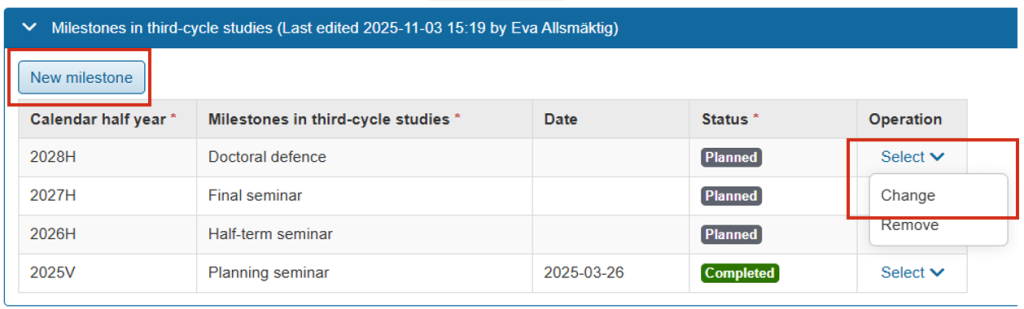
By adding the milestones in third-cycle studies here, it becomes easier to follow the doctoral student’s progression through the education.
Click New milestone and specify:
- Calendar half-year
- Milestone in third-cycle studies: Select a milestone from the drop-down list, or select Optional text to enter your own
- Date: Date of completion (if known, otherwise leave blank)
- Status: Select Planned or Completed
The milestone can be changed as more information becomes available. Click Select → Change on the row for a milestone to change it.
Study activity and funding (SCB)
Planned study activity and funding
Planned study activity and funding can be entered to communicate what the doctoral student is planning for the upcoming six months.
Click New planned study activity and funding and specify:
- Calendar half-year
- Study activity: Planned study activity for the selected half-year is specified as a percentage (max 100%).
- Study funding: Specify the type of funding for the study activity, selected from a list of fixed values. If multiple study funding sources are selected, they must together total 100%.
Reported study activity and funding
This information is retrieved from other parts of Ladok.
It is currently not possible to automatically change study activity from planned to reported. Reporting is therefore handled separately.
Departmental duties
Here you can enter information about departmental duties per half-year.
Click New activity and specify:
- Calendar half-year
- Extent (in percent)
- Description
- Status (planned or completed)
The information can be changed as more information becomes available. Click Select → Change on the row for a departmental duties entry to change it.
Other documentation
Here you can add PDF files that need to be documented in the individual study plan. For example, individual study plans established in another system.
It is possible to add a descriptive text to each file that is uploaded.