Alternative login method in Ladok
This guide is intended for international students. If you are a Swedish student, you should instead access Ladok using BankID or Freja eID+.
Why you should connect an alternative login method
When you finish your studies, you will lose access to your Swedish university account – and with it, your login to Ladok. However, you may need to access Ladok afterwards, for example to retrieve your degree certificate or transcripts.
By connecting an alternative login method while you are still a student, you ensure that you can always log in to Ladok, even after your university account has been closed. There are two methods to choose from:
- European Digital Identity (eIDAS): If you have an eID issued in an EU country other than Sweden, you can use that as an alternative login method.
- Freja for non-Swedish citizens: If you have an international passport with NFC, you can create a Swedish eID via Freja and use that as an alternative login method. Create account here: https://frejaeid.com/en/home/.
How to add an alternative login method
Do this before you finish your studies and lose access to your Swedish university account.
- Log in to Ladok for students with your Swedish university account.
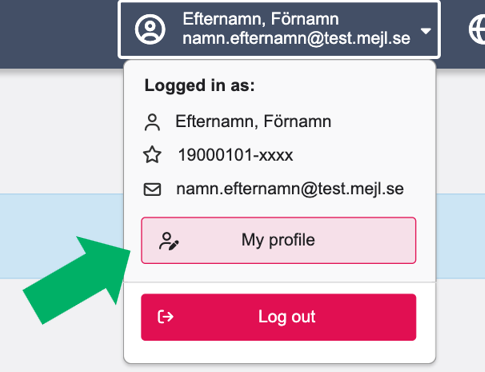
- Click on your name in the top right corner and select My profile.
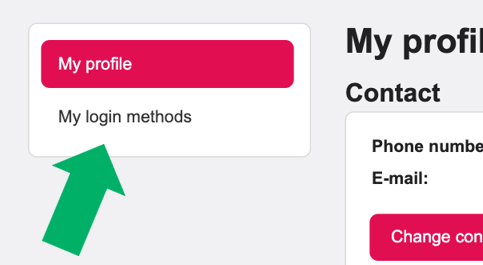
- Select My login methods in the left-hand menu.
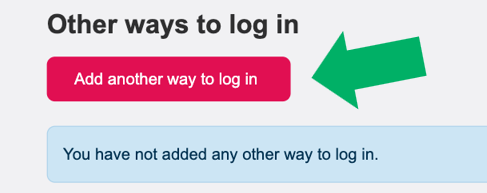
- Click Add another way to log in.
- Select login method: eIDAS or Freja
- Follow the instructions for the selected method and authenticate yourself.
- When you have authenticated yourself, you will be redirected back to Ladok. Your new login method will be listed under Other ways to log in.
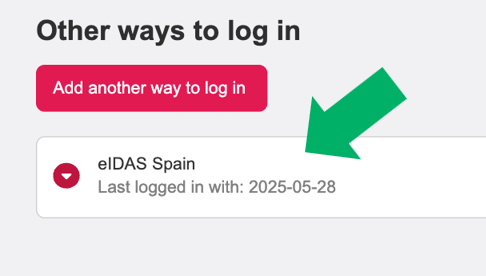
Next time you log in, you can log in using the login method you just connected.
You can add multiple login methods if you wish.