Logging in to Ladok via eduGAIN: guide for IdP administrators
Introduction
Ladok is the student information system used by Swedish higher education institutions. Students use it to register for courses and exams, follow their studies, and apply for and download degree certificates.
Students who have studied in Sweden can log in to Ladok through eduGAIN with the account from their home institution. This also works after they have left Sweden. For this to work, the student’s eduGAIN Identity Provider (IdP) must release certain attributes to Ladok and confirm the student’s identity at a sufficient level of assurance.
This page is for technical staff at institutions in eduGAIN. It describes what Ladok needs from your IdP and how to check your IdP’s configuration with the eduGAIN and Swamid release-check services. You can do the checks with your own account. You do not need a Ladok account, and you do not need a Swedish personal identity number. Use an account similar to a student account; the result only applies to that account.
If you were sent here by a student: the student tried to log in to Ladok with their home institution account, and the login failed because your IdP did not provide all the information Ladok needs. Follow the checks below to find out what is missing.
What Ladok needs from your IdP
For students to log in to Ladok from your IdP, the IdP must implement a number of federation interoperability profiles. Two are required (REFEDS Personalized Access and REFEDS Assurance Framework) and three are recommended (European Student Identifier, REFEDS Code of Conduct v2 for date of birth, and errorURL).
Your IdP can let students log in to Ladok without the recommended profiles, but each one makes the login more reliable and gives students a better experience when something goes wrong.
Steps 1–4 use test services in eduGAIN that request the same attributes as Ladok. If your IdP releases the right attributes to the test service, it will normally release them to Ladok too. Step 5 checks your IdP’s metadata.
Open each link, choose your institution in the discovery service and log in. The test service then shows which attributes your IdP released.
Step 1: REFEDS Personalized Access (required)
Release the Personalized bundle from your IdP in compliance with the profile. Ladok uses the attributes subject-id, givenName and sn (surname).
Check that
subject-idis released and has the formunique-id@scope, where the scope matches your IdP’s registered scope andunique-idonly contains characters from [A-Za-z0-9=-].givenNameandsnare released.
If the check fails
Configure your IdP to release attributes to services in the REFEDS Personalized Access Entity Category. See refeds.org/category/personalized.
Example:
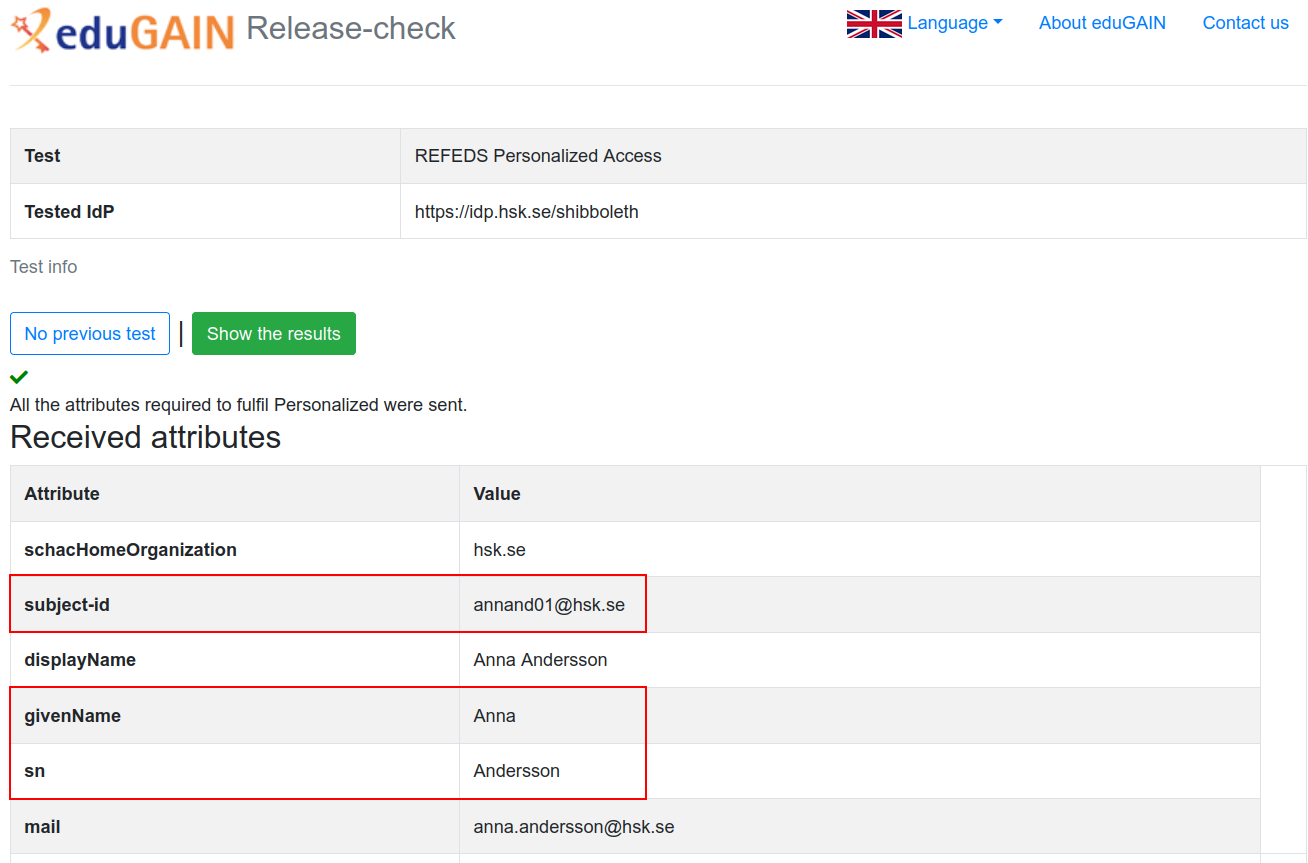
Specification:
Step 2: REFEDS Assurance Framework (required)
Make sure the eduPersonAssurance attribute is released and contains https://refeds.org/assurance (support for the framework) and https://refeds.org/assurance/IAP/medium for users with identities confirmed at assurance level medium. Refer to the profile for requirements for confirmation of users’ identities.
Check that
eduPersonAssurancecontainshttps://refeds.org/assuranceeduPersonAssurancecontainshttps://refeds.org/assurance/IAP/medium.
If the check fails
https://refeds.org/assuranceis missing: your IdP does not yet support the REFEDS Assurance Framework. See refeds.org/assurance.https://refeds.org/assurance/IAP/mediumis missing: either your IdP does not assert assurance level medium, or the account you used has not been confirmed at that level. Students who have not had their identity confirmed at level medium cannot log in to Ladok.
Example:
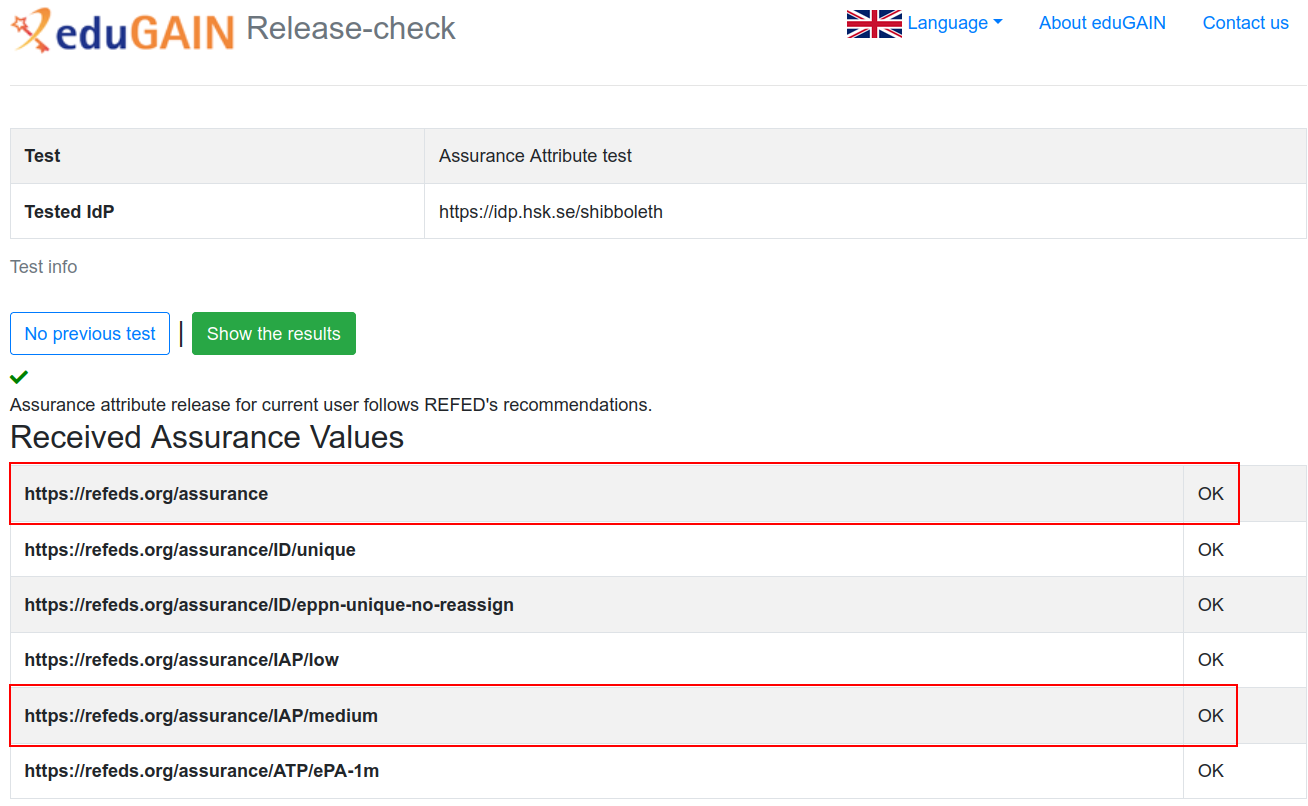
Specification:
Step 3: European Student Identifier Entity Category (recommended for European institutions)
Release schacPersonalUniqueCode with an ESI value, for example urn:schac:personalUniqueCode:int:esi:<your-domain>:<identifier>.
Check that
schacPersonalUniqueCode is released and contains a value starting with urn:schac:personalUniqueCode:int:esi:.
Staff accounts usually have no ESI, so this check may fail even if ESI works for students. If possible, test with a student account.
If the check fails
Configure your IdP to release the ESI to services in the European Student Identifier Entity Category.
Example:
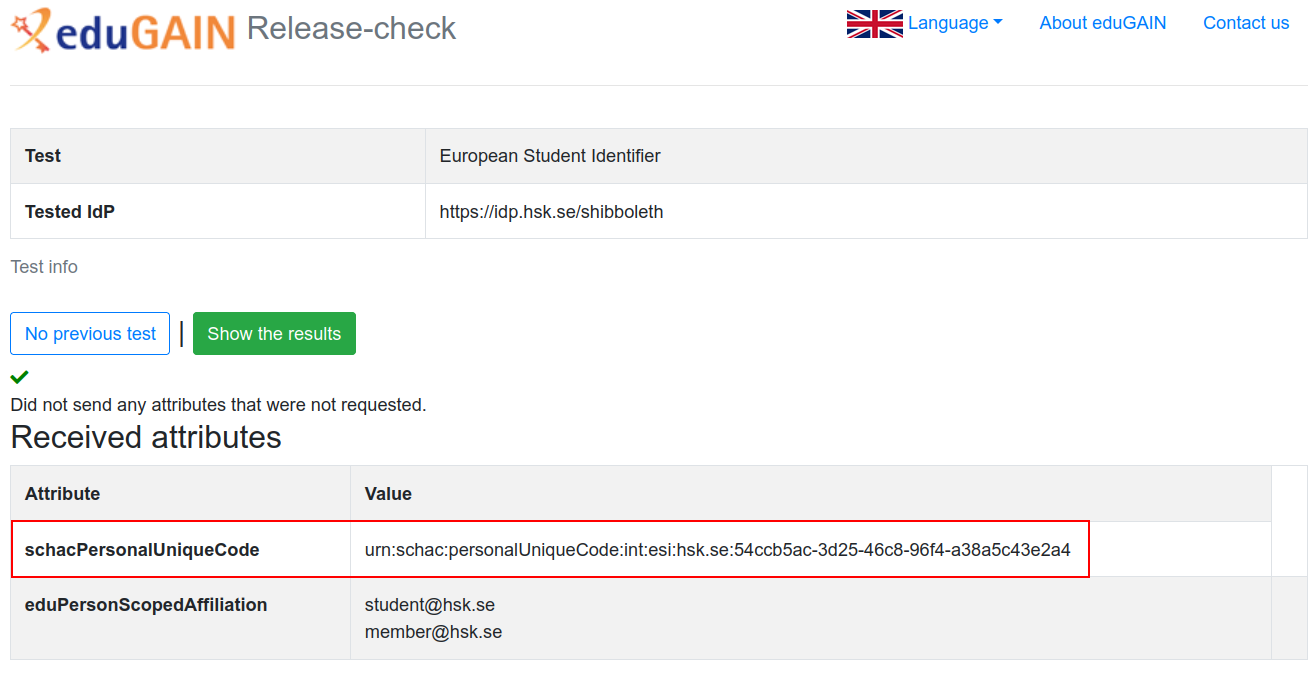
Specifications:
Step 4: Date of birth via REFEDS Code of Conduct v2 (recommended)
Release schacDateOfBirth (format YYYYMMDD). Ladok uses the date of birth to better match the login to the right student. IdPs in Swamid should also release norEduPersonNIN.
Check that
schacDateOfBirthis released in the formatYYYYMMDD- For IdPs in Swamid:
norEduPersonNINis also released
If the check fails
Configure your IdP to release attributes to services in the REFEDS Data Protection Code of Conduct Entity Category, version 2.
Example:
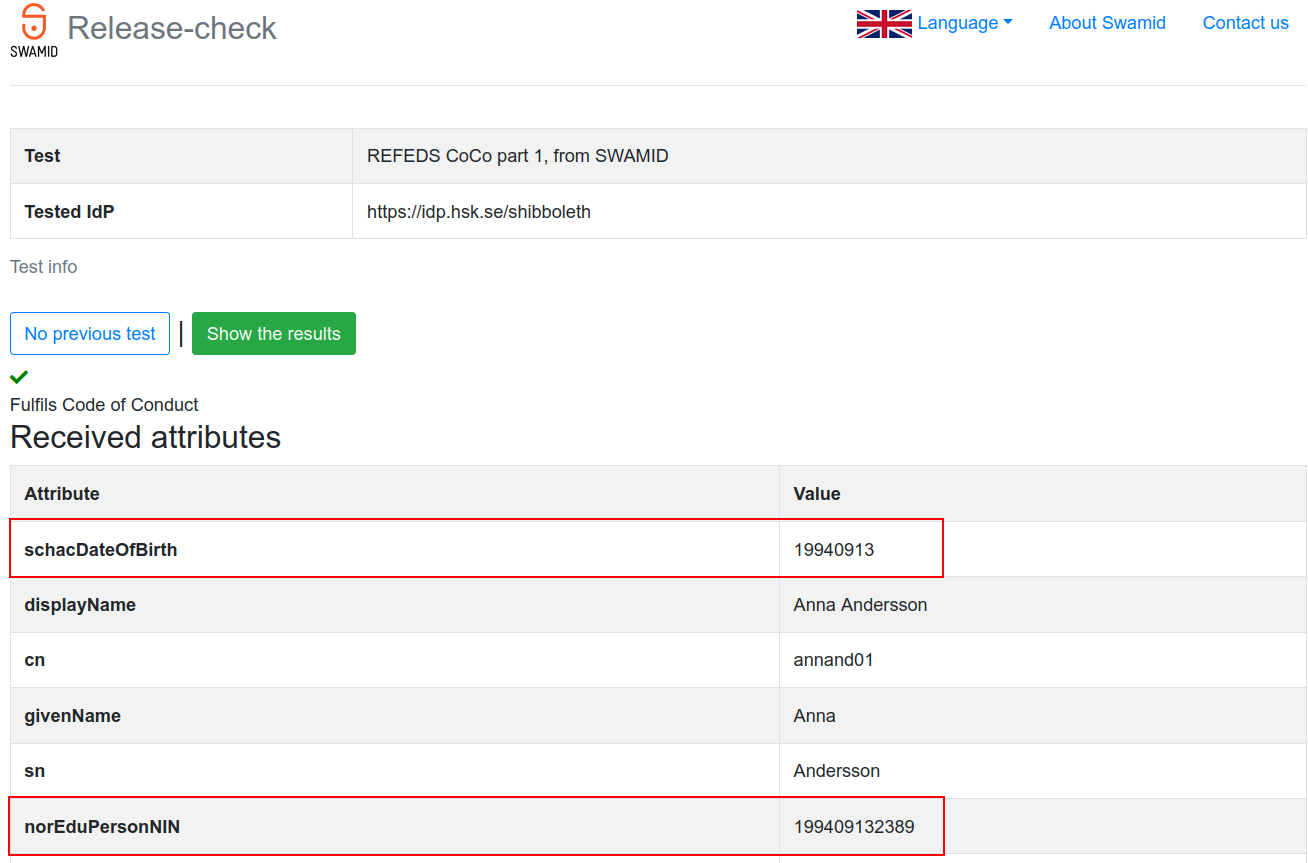
Specification:
Step 5: REFEDS errorURL Deployment Profile (recommended)
Publish an errorURL in your IdP’s metadata according to the REFEDS SAML V2.0 Metadata Deployment Profile for errorURL. If a login fails, Ladok sends the student there, replacing ERRORURL_CODE with an error code such as IDENTIFICATION_FAILURE or AUTHENTICATION_FAILURE, and ERRORURL_CTX with the requirement that failed. Your support page can then tell the student what to do.
Check that
- Your IdP’s metadata contains an
errorURL(under Identity Provider attributes in metadata) - The URL contains at least the placeholder
ERRORURL_CODEand preferably alsoERRORURL_CTX, for example:https://support.example.edu/login-error?code=ERRORURL_CODE&ctx=ERRORURL_CTX
If the check fails
- Create an
errorURL(support page), preferably dynamic, that tells the student what to do. For an example implementation of a dynamic errorURL page, see Swamid errorURL template (github.com). - Add the
errorURLattribute to theIDPSSODescriptorelement in your metadata. Ask your federation operator how to update your metadata.
Example:
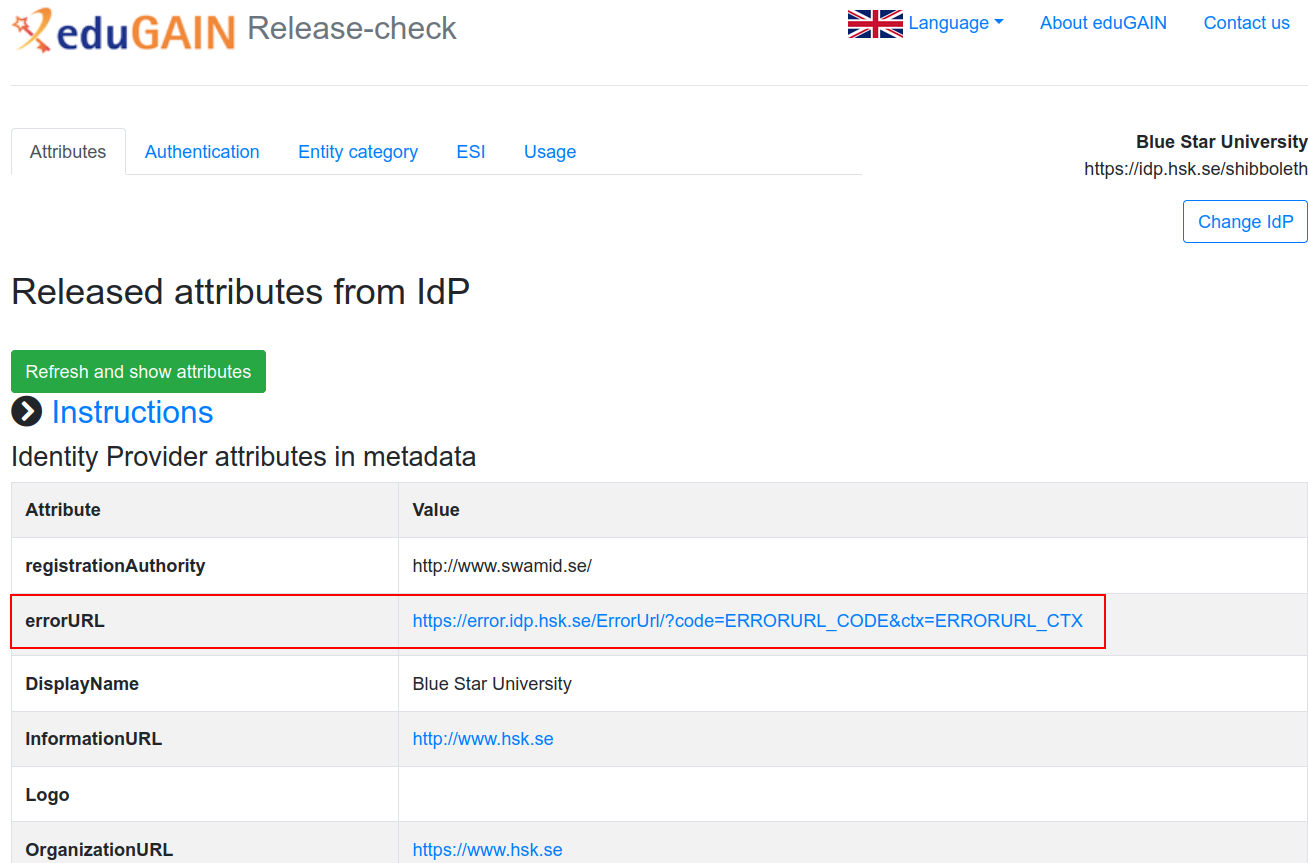
Specifications:
When all checks pass
Ask the student to try logging in to Ladok again. If the login still fails, the student should contact the Swedish higher education institution where they studied.
Summary
| Check | URL to test service | Status for Ladok |
|---|---|---|
subject-id, givenName, sn | personalized.release-check.edugain.org | Required |
| Assurance: REFEDS Assurance Framework 2.0, IAP medium or higher | assurance.release-check.edugain.org | Required |
ESI in schacPersonalUniqueCode | esi.release-check.edugain.org | Recommended for European institutions |
schacDateOfBirth (and norEduPersonNIN for IdPs in Swamid) | cocov2-1.release-check.swamid.se | Recommended |
| errorURL with ERRORURL_CODE and ERRORURL_CTX | release-check.edugain.org/result | Recommended |